

Better Login Security
Protect the WordPress sign-in with limits on failed attempts, two-factor sign-in, CAPTCHA, IP rules and a login page designer. Free, with Pro plans for more.
On this page18 sections
This guide covers installing and using Better Login Security by Quintaphon (version 1.0.1), a free plugin that protects the WordPress sign-in, and Better Login Security Pro, the paid add-on sold in yearly and lifetime plans. Use it to set up the plugin, pick a plan and manage your license.
Tip
Locked out of your own site? Add define( 'QBLS_DISABLE', true ); to wp-config.php. See Emergency switch.
Overview
Better Login Security puts every login protection in one plugin with one settings screen:
- Stop guessing: limit failed attempts, lock out repeat offenders and bot usernames, and keep allow and block lists.
- Stop bots: Google reCAPTCHA on the sign-in, registration and lost-password forms.
- Stop stolen passwords: two-factor sign-in and password rules.
- See what happens: an activity log, a dashboard with a security checklist, and email alerts.
- Make it yours: a login page designer and a custom login address.
The free plugin works on as many sites as you like. Better Login Security Pro is an add-on plugin that unlocks more with a license key. See Free and the Pro plans.
Requirements
| Item | Needed |
|---|---|
| WordPress | 5.8 or newer (tested up to 7.1), single site or multisite |
| PHP | 7.4 or newer |
| User | An administrator. On multisite with the plugin network-activated, a network administrator. |
| Pro | The free plugin, Better Login Security Pro and a license key from a plan |
Install
- Download better-login-security.zip.
- In WordPress go to Plugins > Add New Plugin > Upload Plugin, choose the file, click Install Now and activate it.
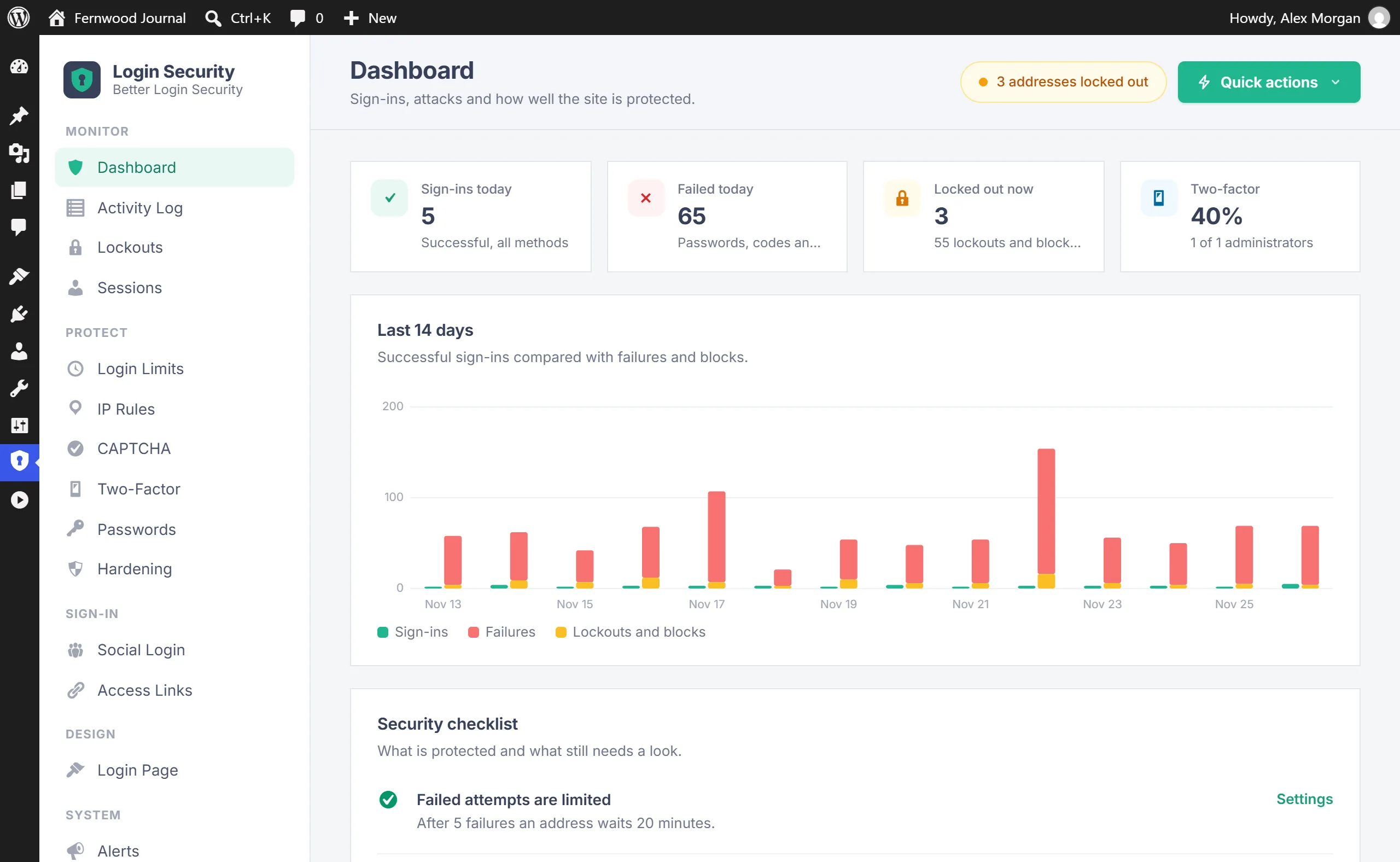
- Open Login Security in the admin menu. The dashboard checklist shows what to set up first.
The plugin is not in the WordPress.org directory yet. Until it is listed there, install it from the ZIP on this site.
First steps
- If your site is behind Cloudflare or another proxy, check IP Rules > Visitor address. The plugin suggests the right setting, and the dashboard warns you if it looks wrong. Without it, every visitor may share one address.
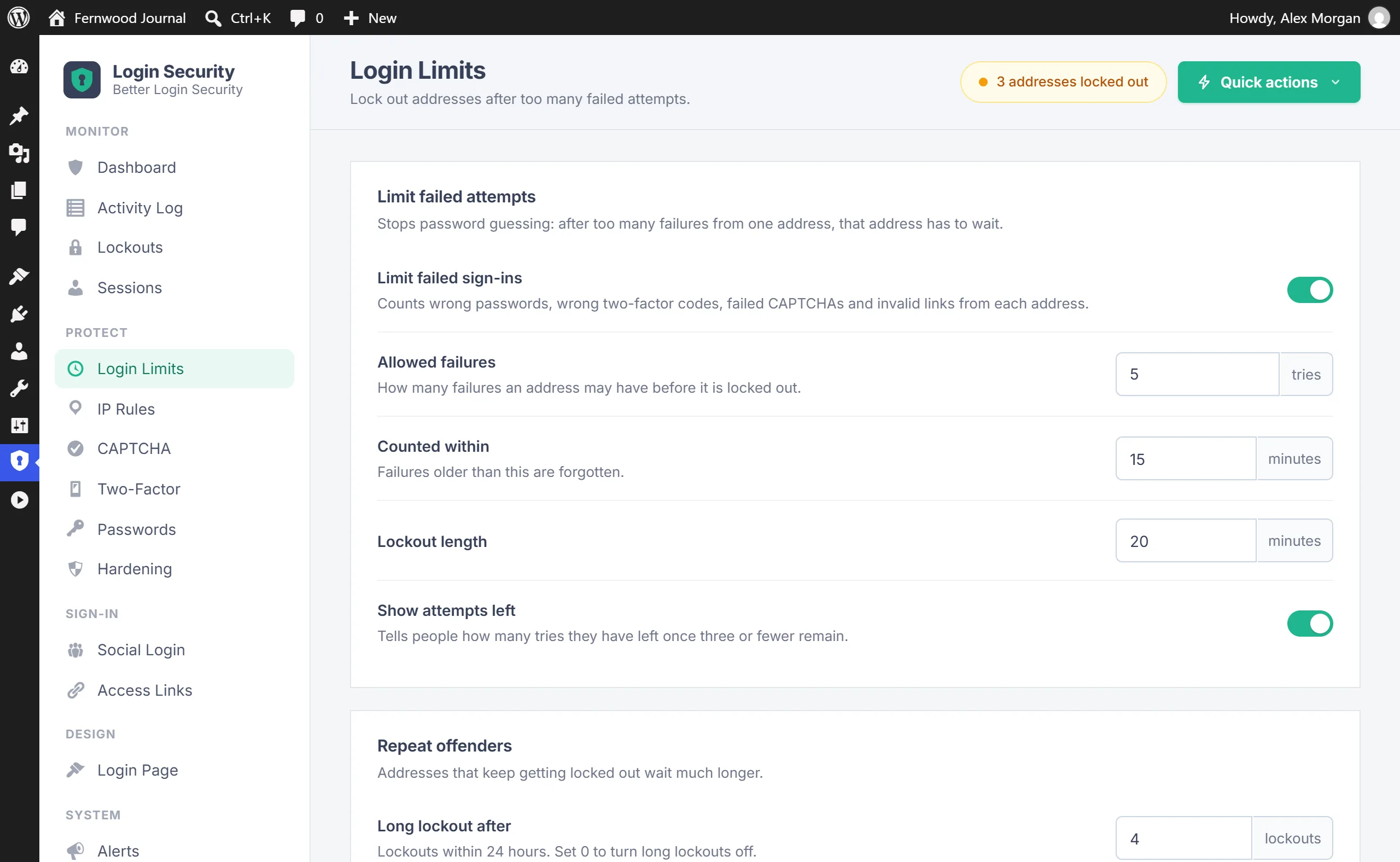
- Set the limit on failed attempts and the lockout times.
- Turn on CAPTCHA and two-factor for the roles that need them.
- Work through the checklist on the dashboard.
Free and the Pro plans
Each plan includes everything in the plan before it.
Free (unlimited sites)
- Login designer with 3 templates (Classic, Clean Card, Minimal Line), logo, colours, texts and hidden links
- Custom login address (hides wp-login.php)
- Limit failed attempts, lockouts, instant-lockout usernames
- Allow and block lists (addresses and networks)
- Google reCAPTCHA v2 and v3 on sign-in, registration and lost password
- Two-factor by email code, required for chosen roles
- Passwords: minimum length, common passwords blocked
- Activity log (up to a year), dashboard, security checklist
- Email alerts: long lockouts, new administrators, two-factor turned off
- Hardening: XML-RPC, hidden usernames, vague errors, application passwords, session length, one session per user, hidden version
- Export and import settings; per-site settings on multisite
Basic
Everything in Free, plus:
- Authenticator app, backup codes and trusted devices
- 7 premium templates and 43 Google Fonts, served locally
- Background image, overlay, corner radius, width, shadow and custom CSS
- Cloudflare Turnstile and hCaptcha
- Leaked password check, expiry, reuse history, character rules and personal info check
- Activity log CSV export
- Standard support
Professional
Everything in Basic, plus:
- Country allow and block, whole-site block
- All 10 alert types, Slack and webhooks, with repeats held back
- An alert on every administrator sign-in
- Active sessions: see and end sign-ins
- New-device emails to users
- CAPTCHA on WooCommerce, comments and multisite sign-up, or only after a number of failures
- Force a password change, require app setup for roles
- Priority support
Business
Everything in Professional, plus:
- Social login: Google, Apple, Microsoft, GitHub, Facebook, LinkedIn and any OpenID Connect provider
- Two-factor after social sign-in
- Temporary access links and temporary users
- Emailed sign-in links
- Multisite network mode: one set of rules and one log, optional per-site designer
- Priority support
Sites and terms
| Choice | What you get |
|---|---|
| Sites | 1, 3, 10 or unlimited sites on one key. |
| Yearly | Paid once a year and never renewed automatically. Updates and support for 12 months; Pro keeps working after that. |
| Lifetime | One payment, updates for life, nothing to renew. |
Prices are on the plugin page. Yearly prices are also shown per month there, but they are billed once a year.
Buy a plan
- On the plugin page, pick Yearly or Lifetime, the number of sites and a plan, then click Get.
- Pay on Stripe's secure checkout page.
- Your license key is on the thank-you page and arrives by email. It is also in My account, where you download Better Login Security Pro.
Signed in to My account? You can also buy a plan from its Buy and renew tab. Plans, renewals and upgrades have a 14-day money-back guarantee; see the Refund Policy.
Enter the license key
- Install better-login-security-pro.zip with Plugins > Add New Plugin > Upload Plugin and activate it. Keep the free plugin active.
- Open Login Security > License (in the wp-admin menu the plugin shows as Login Security).
- Paste the key and save. The site is added to your key and the Pro features of your plan switch on.
On multisite with the plugin network-activated, enter the key in Network Admin, under the same menu. When the plugin is activated site by site, enter the key on each site.
Sites on a key
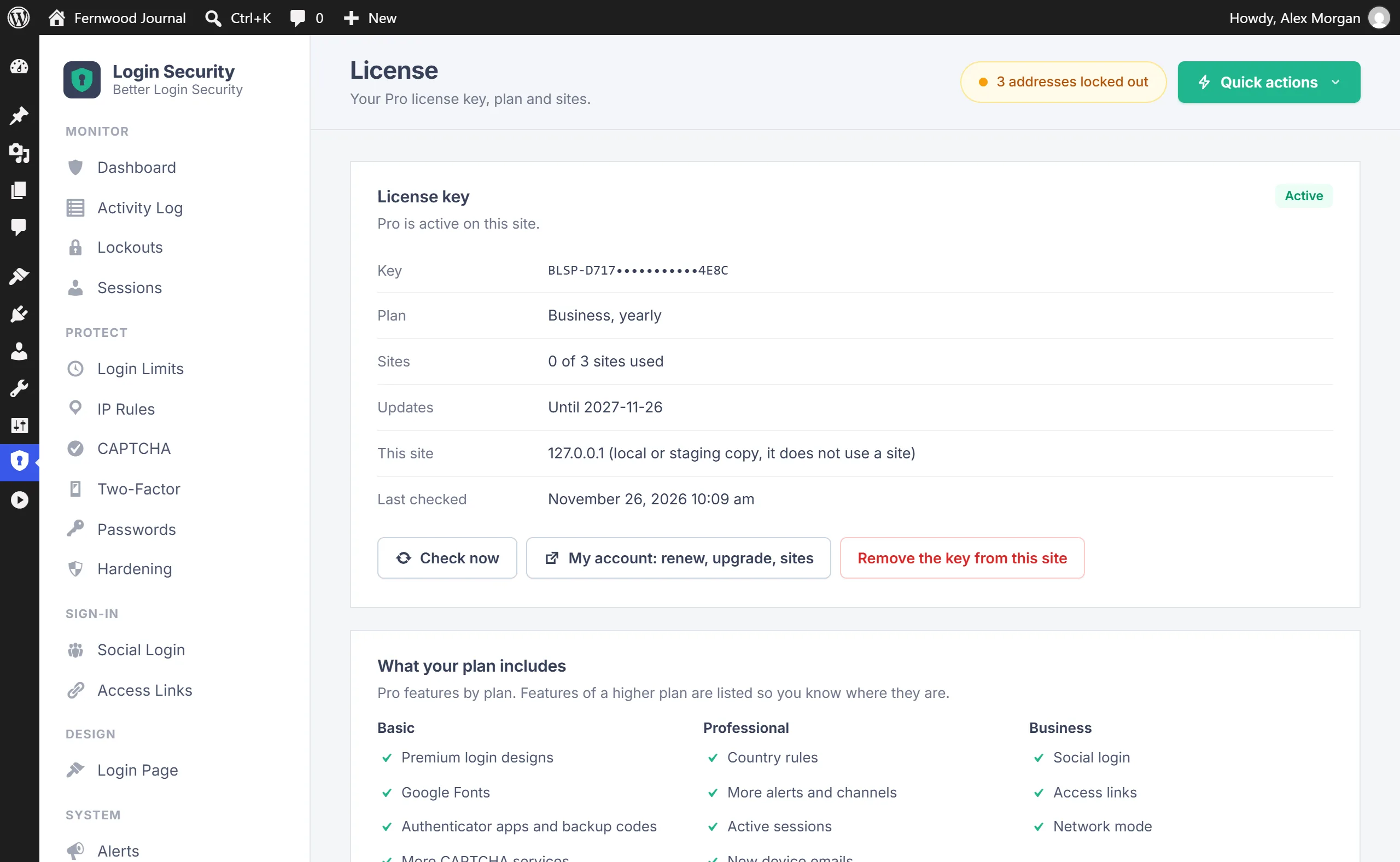
- A key works on as many sites as its plan: 1, 3, 10 or unlimited.
- A site is added to the key the first time Pro checks the key there. My account lists the sites on each key and how many are used.
- When every site on the key is used, a new site is refused until you remove one or upgrade to more sites.
- Local and test copies never use a site:
localhost,127.0.0.1and every other127.*address, private network addresses (10.*,192.168.*and172.16.*to172.31.*),::1,0.0.0.0, and names ending in.localhost,.test,.local,.invalidor.example. - A staging copy on one of those addresses is free. A staging copy on a public address, such as staging.example.com, uses a site like any other.
Move Pro to another site
Free a site on the key, then enter the key on the new site. There are two ways to free one:
- In My account, for a site you can no longer reach: open Licenses, find the site under your key and click Remove. You can remove up to 5 sites per key in 30 days; My account shows how many removals are left.
- On the site, the best way: open Login Security > License on the old site and click Remove the key from this site.
A site removed in My account that still has Pro active with the key takes a free site again at its next license check, so deactivate the key there too when you can. A site that is no longer on the key runs without Pro; see When Pro is off.
When a yearly plan ends
- Yearly plans never renew automatically. We email you 14 days and 3 days before the end date.
- When the plan ends, Pro keeps working on your sites with every feature of your plan. Only updates and support stop.
- Renew any time from My account. The renewal costs the yearly price of your plan and number of sites, and adds 12 months to the end date, or 12 months from the day you renew if the plan has already ended.
- Lifetime plans never end and never need renewing.
Upgrade
Move to a higher plan, to more sites, or from yearly to lifetime at any time with the Upgrade picker under your key in My account. Your key stays the same, and you pay only the difference:
| Upgrade | You pay |
|---|---|
| Lifetime to a bigger lifetime plan | The new lifetime price minus your plan's lifetime price, at today's prices. |
| Yearly to a bigger yearly plan | The difference between the two yearly prices for the days left on your plan. If your plan has already ended, the full new yearly price, and a new year starts that day. |
| Yearly to lifetime | The lifetime price minus the unused part of your yearly plan. |
A plan can not move from lifetime to yearly or to fewer sites. The smallest charge is $0.50.
When Pro is off
If Better Login Security Pro is deactivated, its key is cancelled, or the site was removed from the key, the free plugin keeps protecting the site. Until Pro is back:
- users with an authenticator app sign in with email codes instead;
- temporary users can not sign in;
- network mode falls back to per-site settings, with a notice;
- users who only signed in with social login use Lost password to set a password.
An ended yearly plan changes nothing on the site except updates.
Multisite
- Site by site (every plan and Free): activate the plugin on each site for separate settings and a separate activity log.
- Network mode (Business): network-activate it for one set of rules and one activity log for the whole network, managed under Network Admin. You can let each site design its own login page.
- With the plugin network-activated, the Pro license key is entered in Network Admin.
Emergency switch
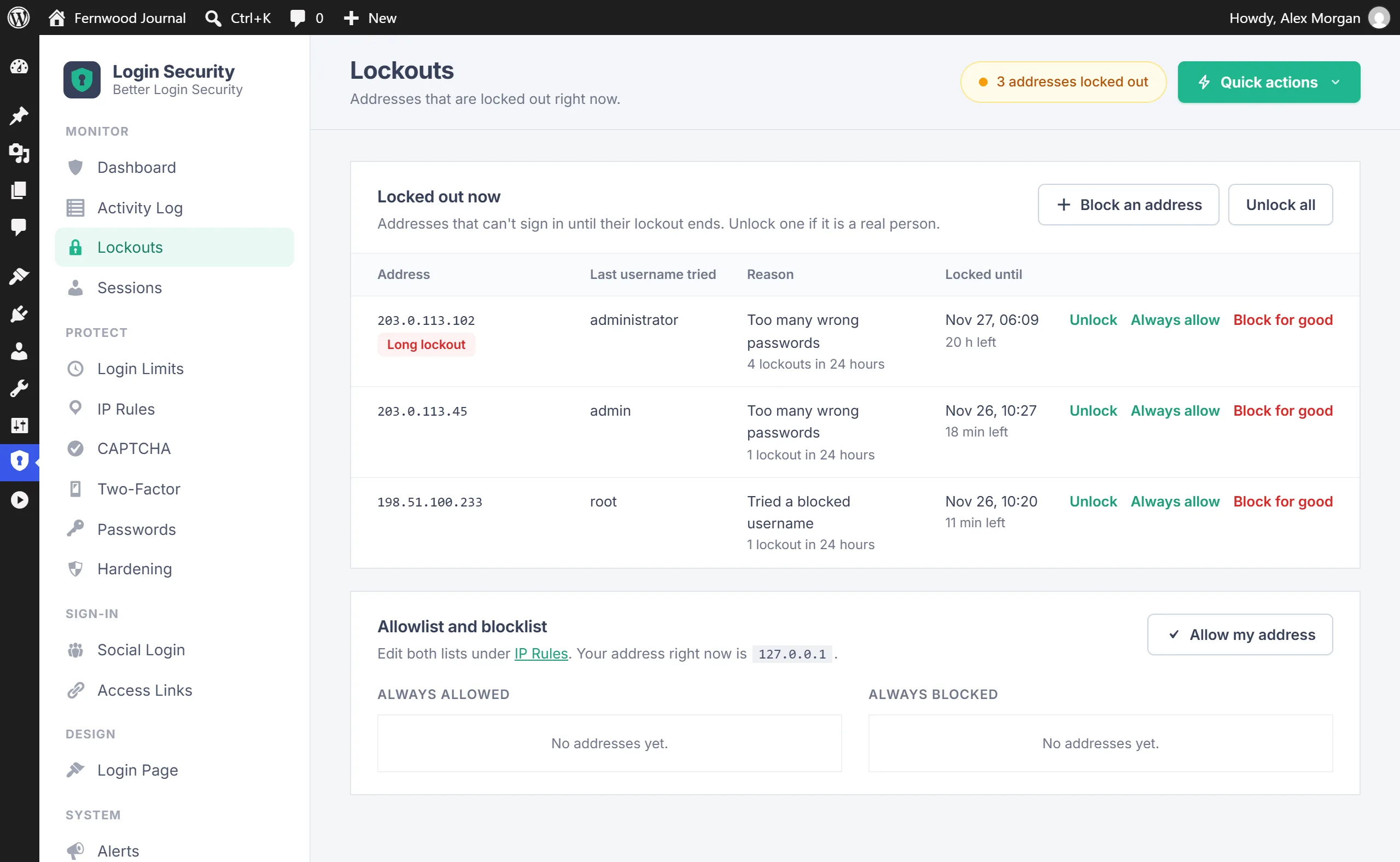
Locked out? First wait for the lockout to end, or sign in from another connection (for example your phone on mobile data) and unlock your address under Login Security > Lockouts. If that is not possible:
- Open
wp-config.phpwith your host's file manager or over FTP. - Add this line above the line that says "That's all, stop editing!":
define( 'QBLS_DISABLE', true ); - Sign in. The plugin does nothing while the line is there.
- Fix the setting that locked you out, then remove the line again.
External services and your data
- The free plugin sends no data to Quintaphon.
- Pro sends its license key and your site's domain to our license server, to check the key and to get updates. It sends nothing about your users or visitors.
- Google reCAPTCHA, Cloudflare Turnstile, hCaptcha, social login providers, Google Fonts, Have I Been Pwned (Pwned Passwords), Slack and your own webhook are contacted only for features you turn on and set up. The plugin's readme lists what each one receives.
Troubleshooting
| Problem | What to do |
|---|---|
| Everyone in the log has the same address | Your site is behind a proxy such as Cloudflare. Set IP Rules > Visitor address to the setting the plugin suggests. |
| A user lost their phone | They sign in with a backup code, or by email code if that method is on. An administrator can also reset their two-factor from Users > Edit user. |
| The key is refused on a new site | Every site on the key is used. Remove a site in My account or upgrade to more sites. |
| Pro shows no updates | A yearly plan has ended, or the site is no longer on the key. Renew, or enter the key again, in My account. |
| You are locked out | Use the emergency switch. |
Changelog
- 1.0.1 (November 26, 2026): The free plugin keeps the activity log for up to a year. Small clean-ups of the settings screens and of the sign-in after the two-factor step.
- 1.0.0 (November 26, 2026): First release of Better Login Security and Better Login Security Pro.
Need help?
With a plan, open a ticket from My account; anyone can reach us through the support page. You can also download the latest free version (v1.0.0) here.