
This guide covers installing and using Duplicate Post Finder by Quintaphon (version 1.0.1), a free plugin that finds duplicate posts, tags and categories and stops new duplicate posts from being published. Use it for the first setup and as a reference for every screen.
Tip
The plugin's menu in WordPress is called Duplicates. It has five screens: Overview, Duplicate posts, Duplicate terms, Multiple categories and Settings.
Overview
- Duplicate posts: every group of posts that share a title, with one-click clean-up.
- Warning in the editor: a notice as soon as the title of the post you are writing is already used.
- Publish block: a post can not go live while a published post has the same title.
- Duplicate terms: categories and tags with the same name, merged into one.
- Multiple categories: posts filed in more than one category.
Nothing is deleted unless you ask for it, and trashed posts can be restored from the WordPress trash.
Requirements
| Item | Needed |
|---|---|
| WordPress | 5.8 or newer (tested up to 7.1) |
| PHP | 7.2 or newer |
| Editor | Block editor or classic editor |
Install
- Download duplicate-post-finder.zip.
- In WordPress go to Plugins > Add New Plugin > Upload Plugin, choose the file, click Install Now and activate it. (Duplicate Post Finder is not in the WordPress.org directory yet.)
- Open Duplicates in the admin menu.
The warning and the publish block are on as soon as the plugin is active, for posts. Add pages or other post types under Settings.
Overview screen
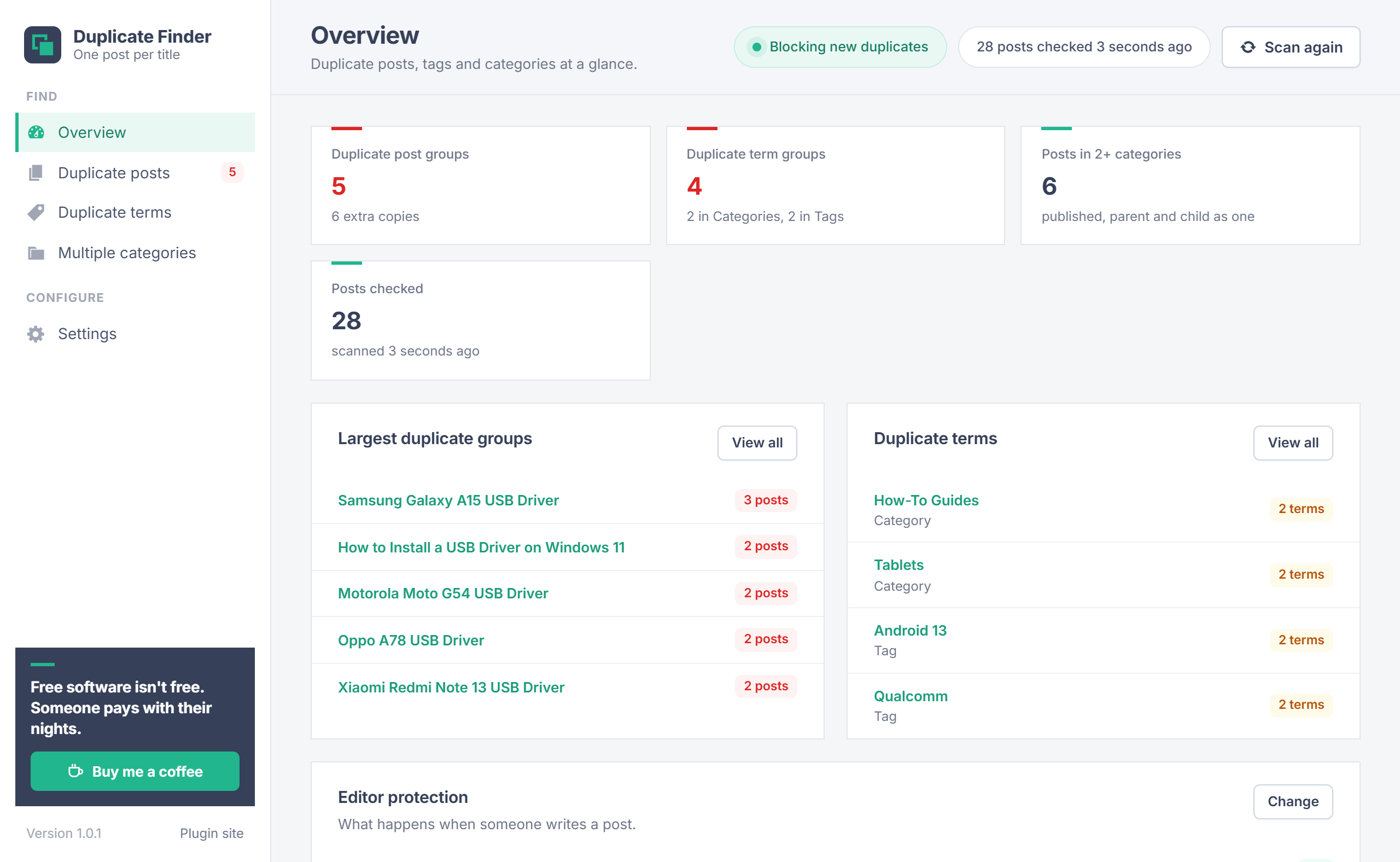
The Overview shows the number of duplicate post groups (and how many extra copies they hold), duplicate term groups per taxonomy, published posts in two or more categories, and how many posts were checked. Below that are the largest duplicate groups, the duplicate terms and the state of the editor protection.
The scan runs when you open the plugin and is kept until a post changes. Scan again at the top runs it right away. A site with 50,000 posts is scanned in a few seconds.
Duplicate posts
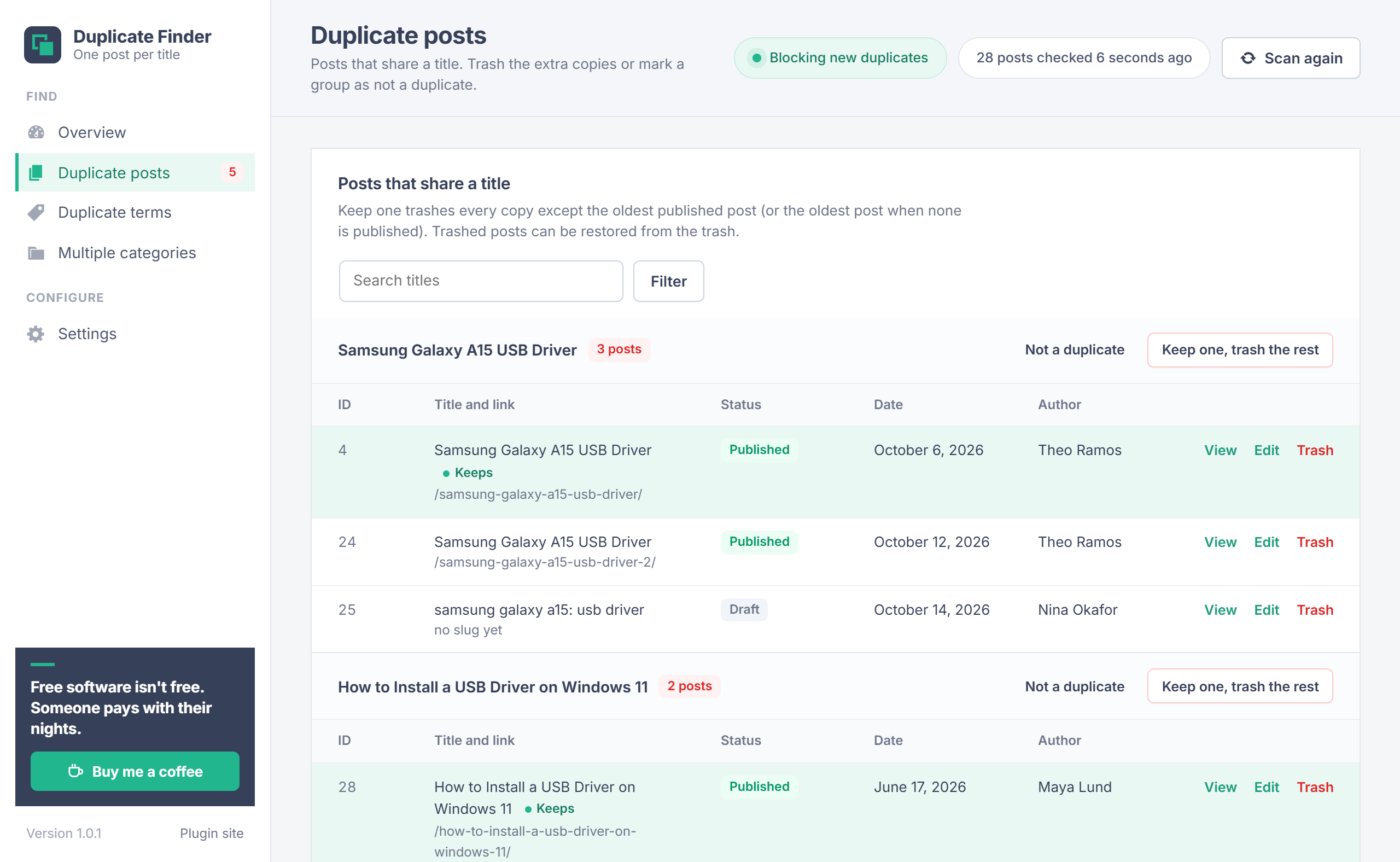
Each group lists the posts that share a title, with their ID, link, status, date and author. The post marked Keeps is the oldest published post, or the oldest post when none is published.
| Action | What it does |
|---|---|
| Keep one, trash the rest | Moves every post in the group except the one marked Keeps to the trash. |
| Trash | Moves a single post to the trash. |
| Not a duplicate | Skips this title from now on. See Not a duplicate. |
| View / Edit | Opens the post or its edit screen. |
Search the list by title, and filter by post type when you check more than one.
Before trashing published posts
The trashed post's URL stops working. If it is indexed or linked, add a redirect to the post you keep.
Title matching
| Mode | Ignores | Example |
|---|---|---|
| Loose (default) | Case, accents, punctuation, symbols and extra spaces | "Galaxy A15: USB Driver!" matches "galaxy a15 usb driver" and "Café" matches "Cafe" |
| Exact | Case and extra spaces | "Galaxy A15 USB Driver" matches "galaxy a15 usb driver", but not "Galaxy A15: USB Driver" |
Titles are compared within one post type, so a page and a post may share a title. HTML entities are decoded first, so "Tom & Jerry" and "Tom & Jerry" match.
Warning in the editor
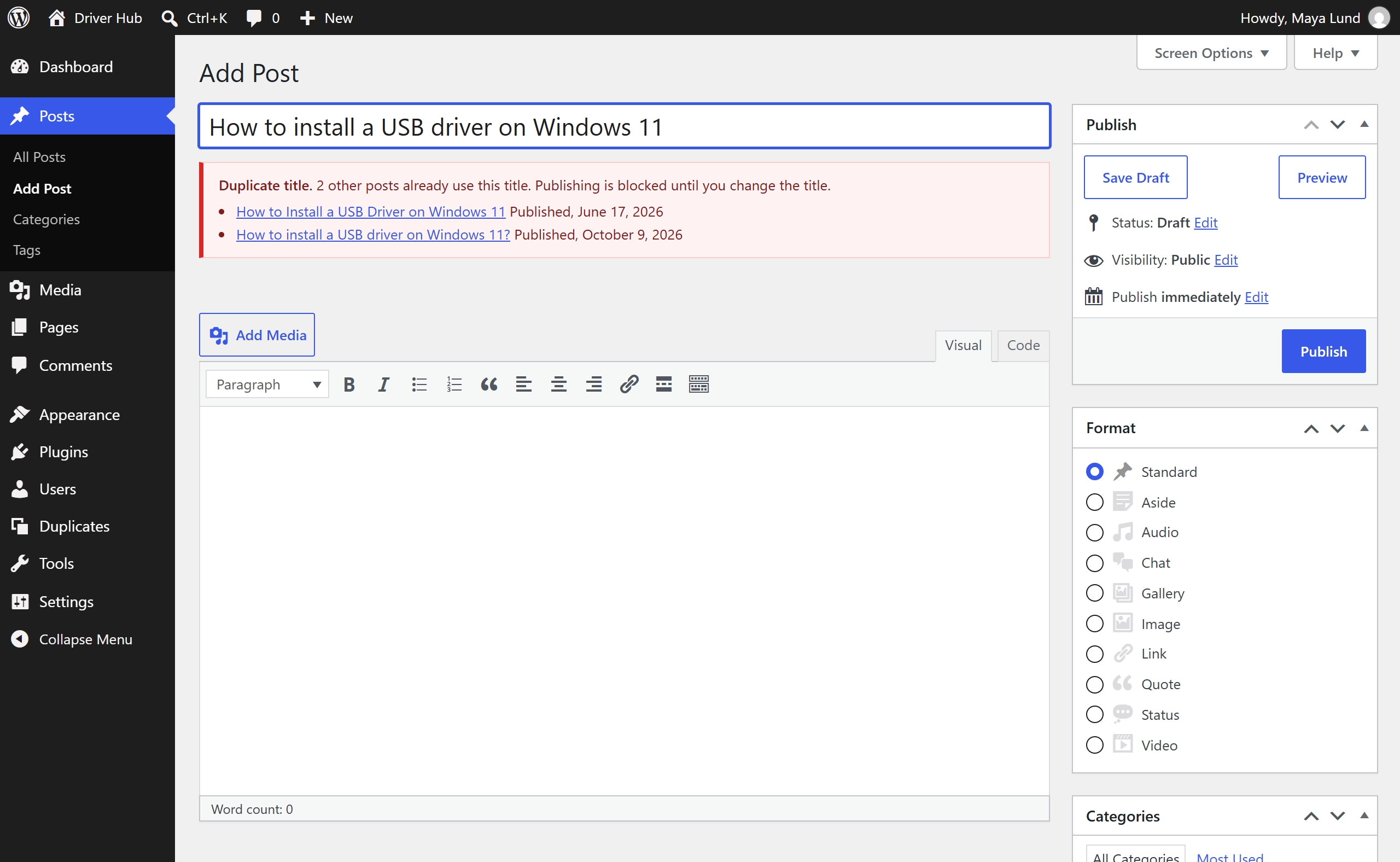
While a post is being written, the plugin checks its title against your other posts:
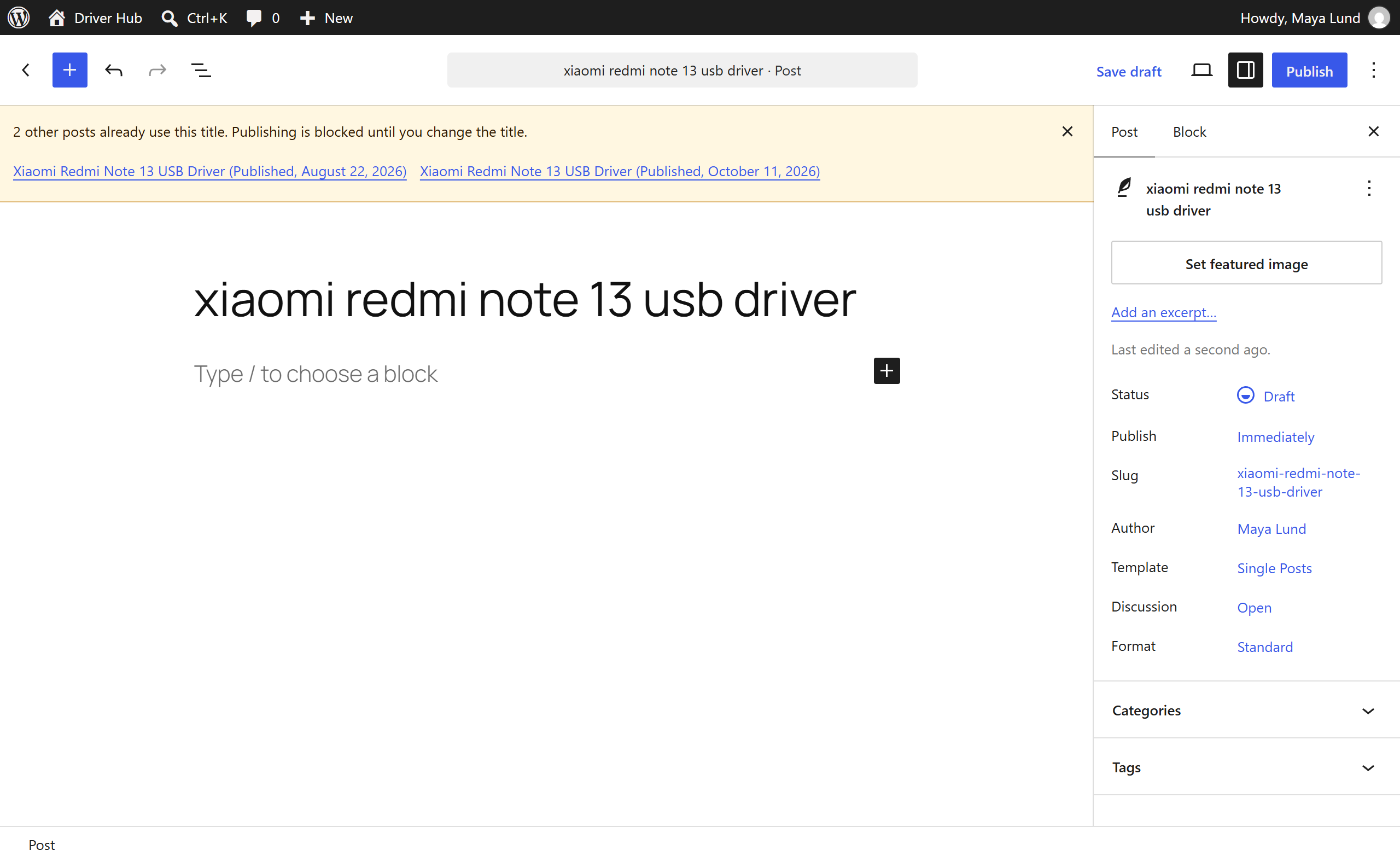
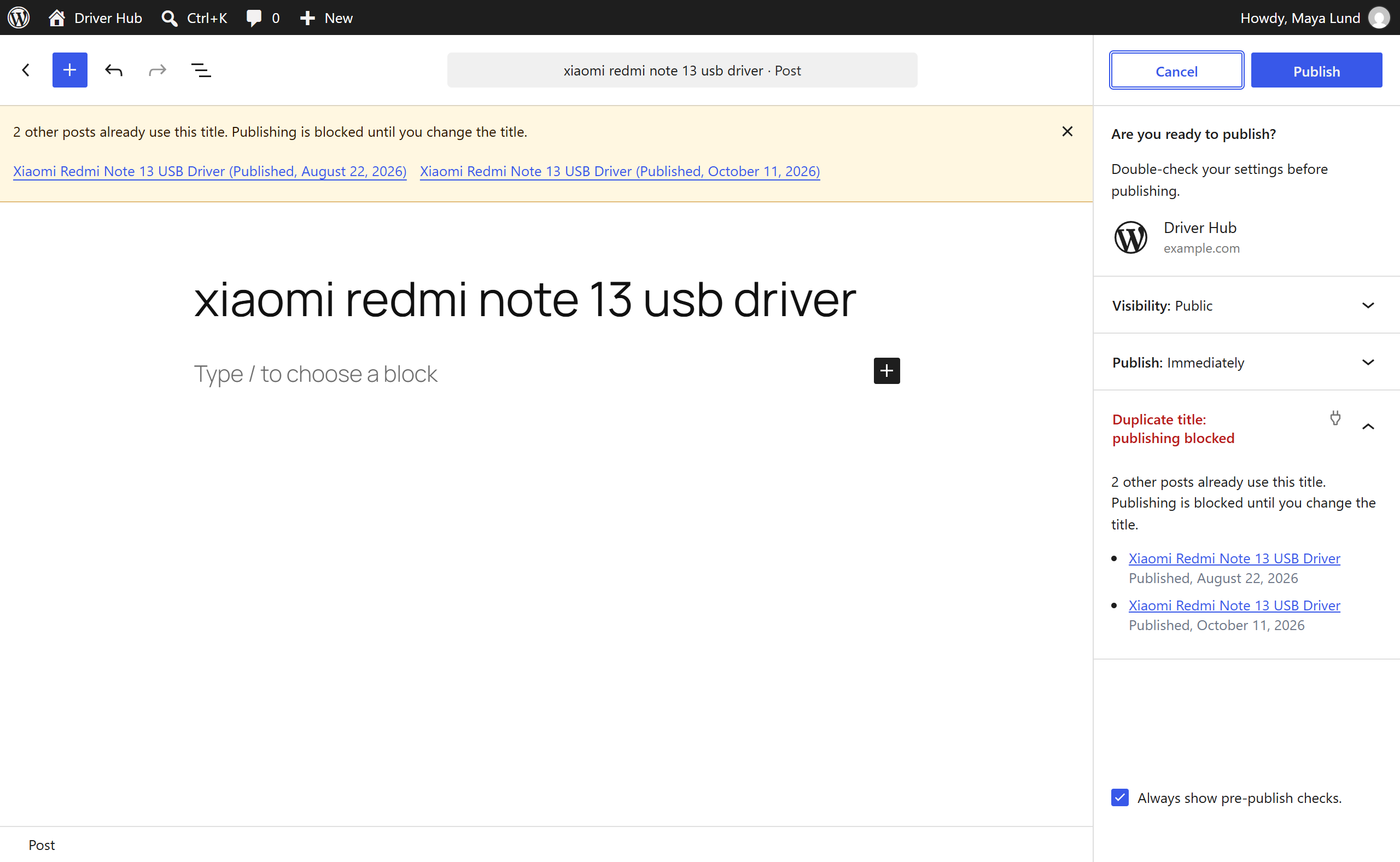
- Block editor: a notice at the top lists the posts that already use the title, with links. The pre-publish check shows the same list, in red when publishing is blocked.
- Classic editor: a box under the title field, red when publishing is blocked.
The warning appears about a second after you stop typing and disappears as soon as the title is unique. It mentions posts in every status you scan, including drafts and pending posts.
Publish block
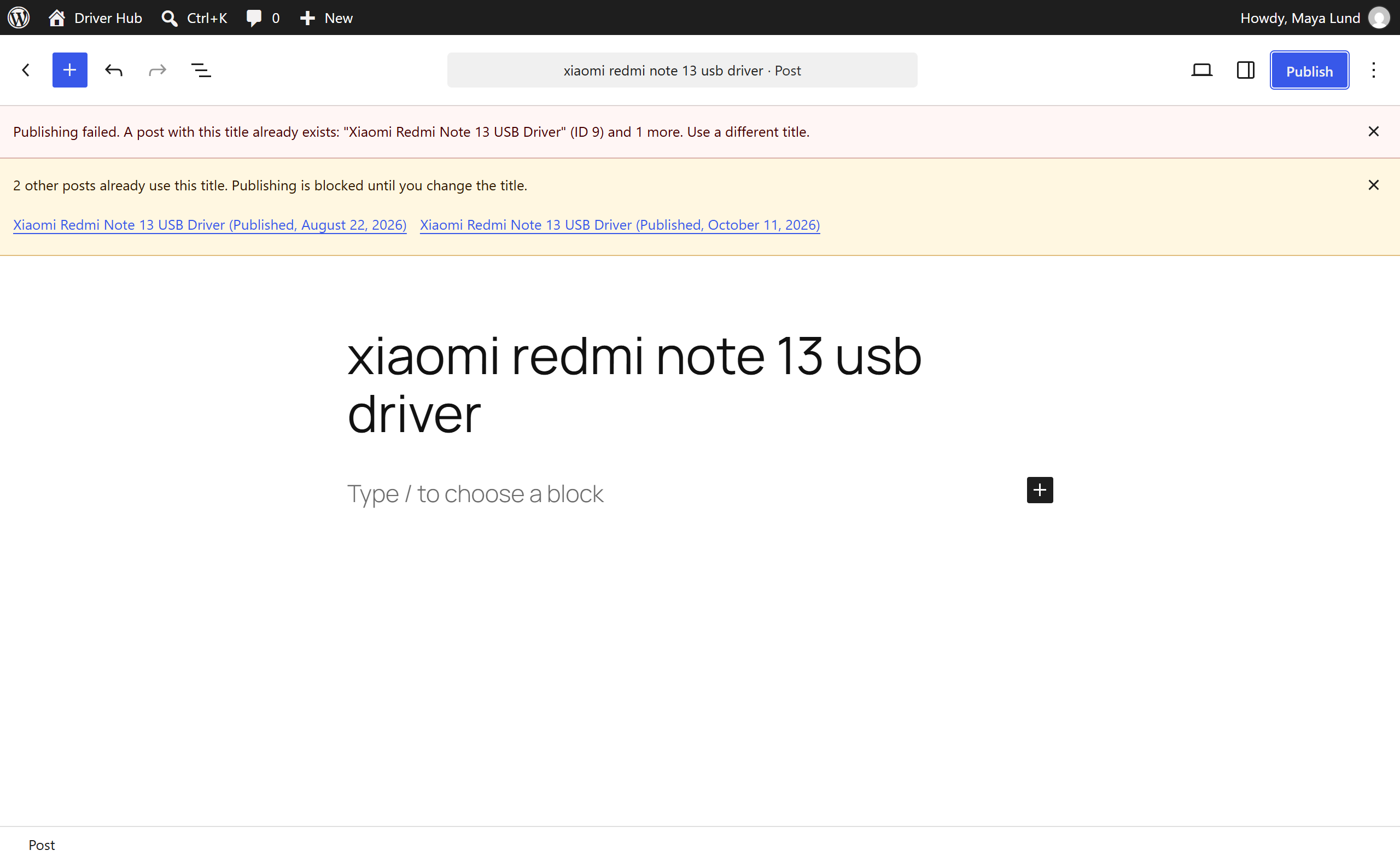
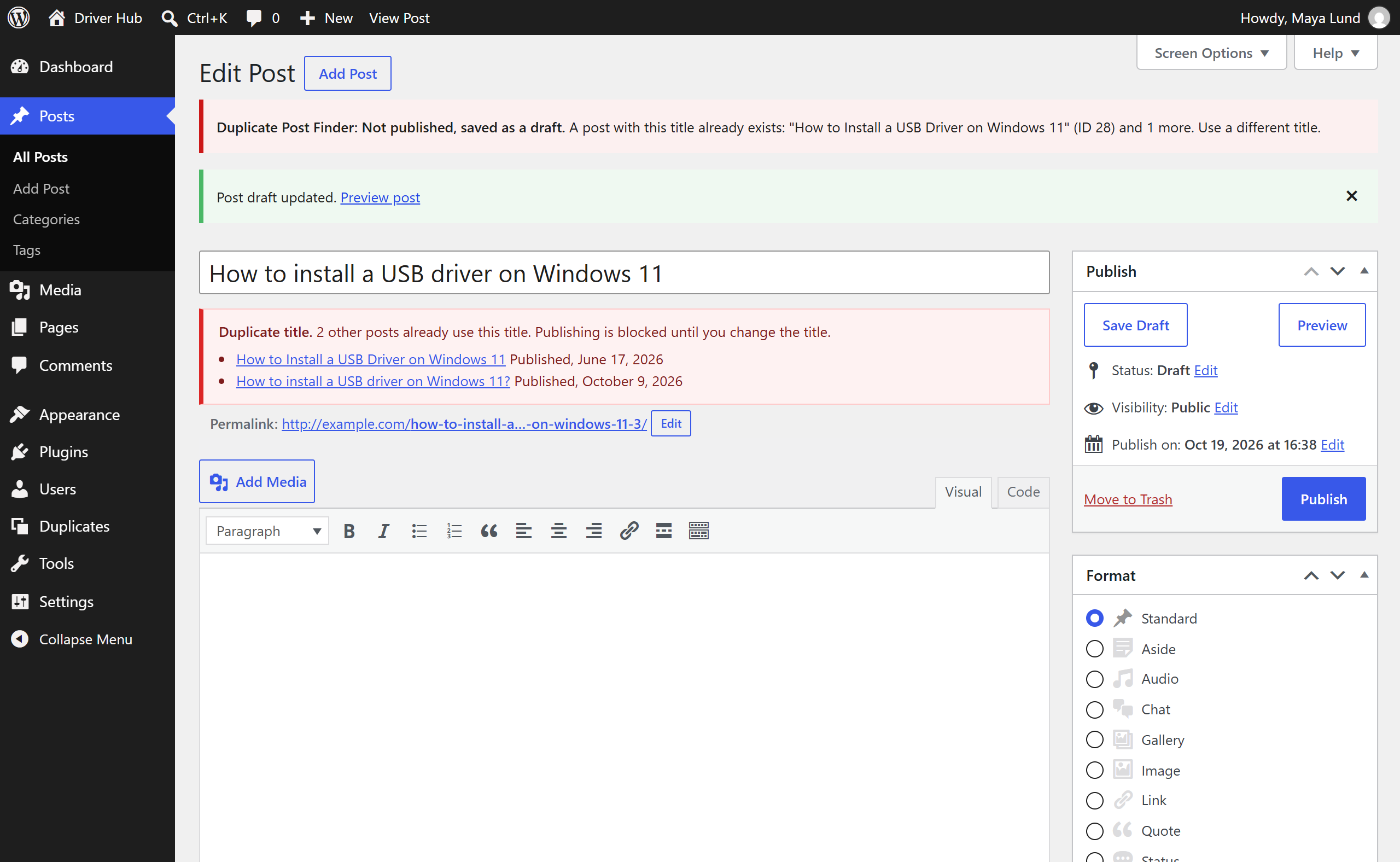
A post can not be published, scheduled or made private while a published, scheduled or private post of the same type has the same title. Drafts and pending posts never block, and saving a draft is always allowed.
| Where | What happens |
|---|---|
| Block editor and REST API | Publishing fails with "A post with this title already exists" and the post stays a draft. |
| Classic editor | The post is saved as a draft, with a notice naming the post that already uses the title. |
| Quick Edit, XML-RPC, imports | The post is saved as a draft. |
| Renaming a published post to a used title | The new title is not saved; the post keeps its old title and stays published. |
| Editing an old duplicate without changing its title | Allowed, so existing content can always be updated. |
Duplicate terms
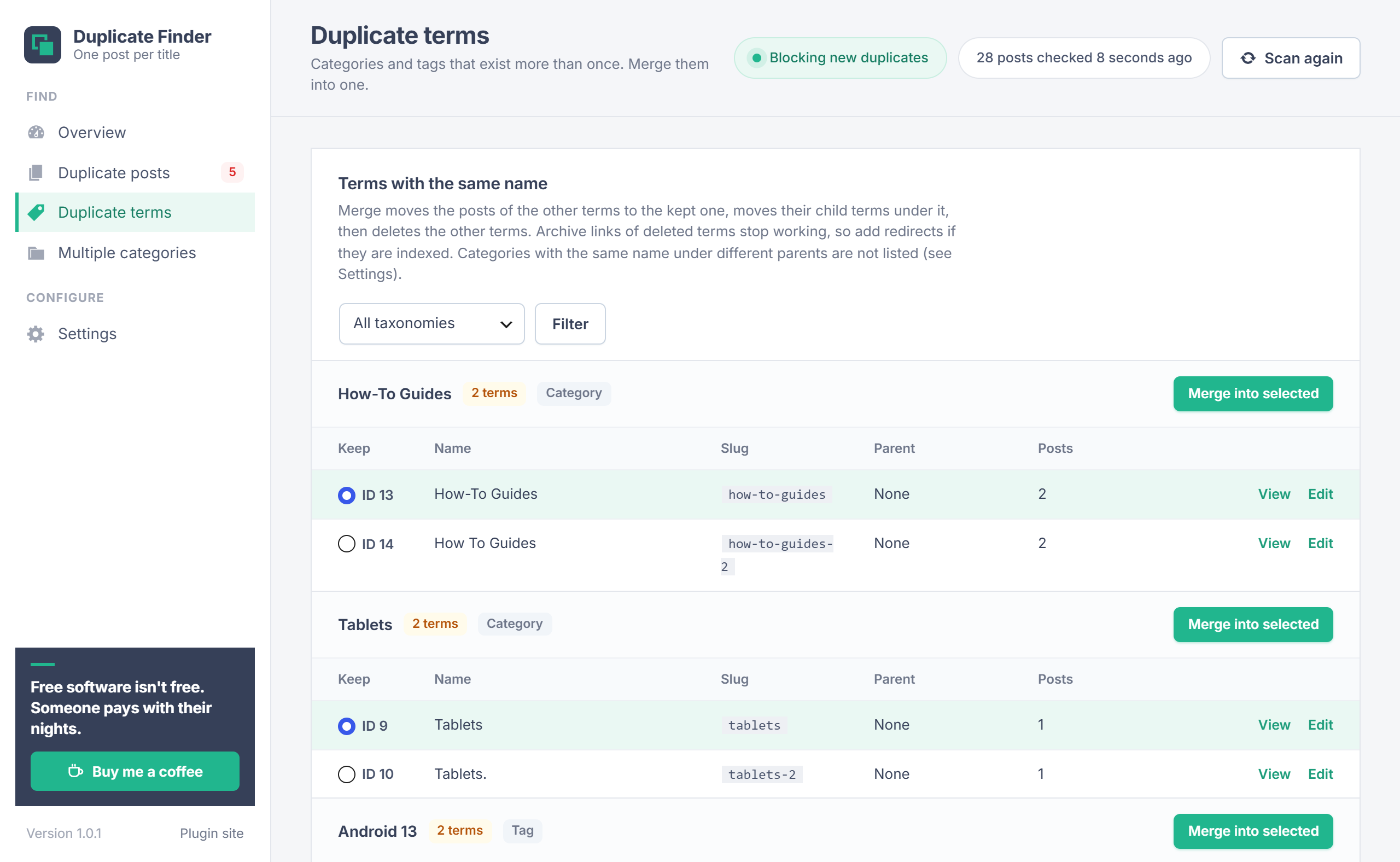
Lists categories, tags and other taxonomies you check whose names match, using the same title matching: for example "Android 13" and "android-13", or "Tablets" and "Tablets.".
- In each group, select the term to keep under Keep. The default is the one with the most posts (or the default category).
- Click Merge into selected and confirm.
The posts of the other terms are added to the kept term, their child categories move under it, and the other terms are deleted. The default category is never deleted. Archive links of deleted terms stop working, so add redirects if they are indexed.
By default, categories with the same name under different parents (for example Samsung > Tablets and Lenovo > Tablets) are not listed. Change this under Settings.
Multiple categories
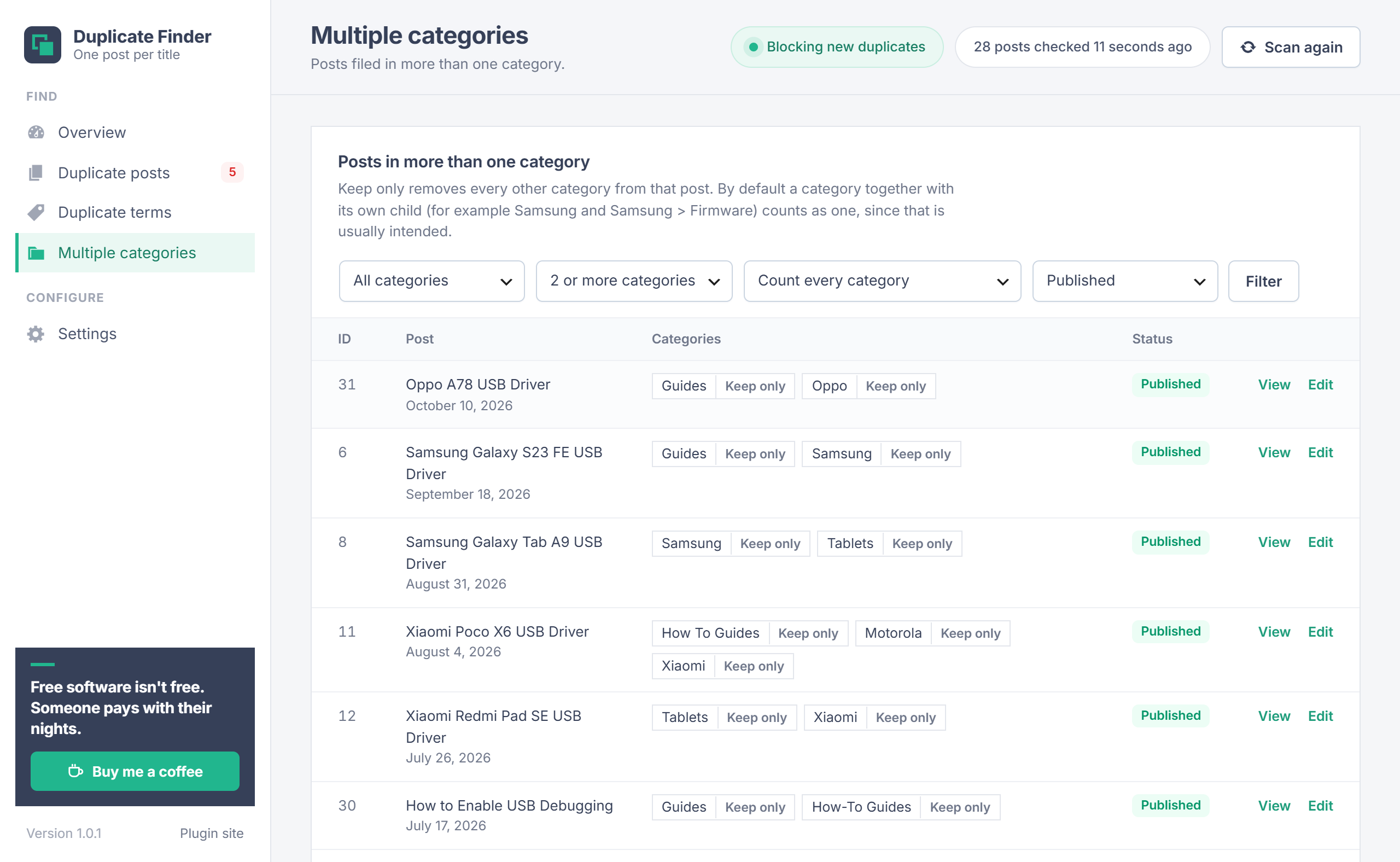
Lists posts filed in two or more categories, newest first, with their categories. Keep only on a category removes every other category from that post.
Filters: a category, the minimum number of categories (2 to 5), published posts or all statuses, and how parent categories count. By default a category together with its own child (for example Samsung and Samsung > Tablets) counts as one, since that is usually intended; choose Count every category to list those posts too.
Settings
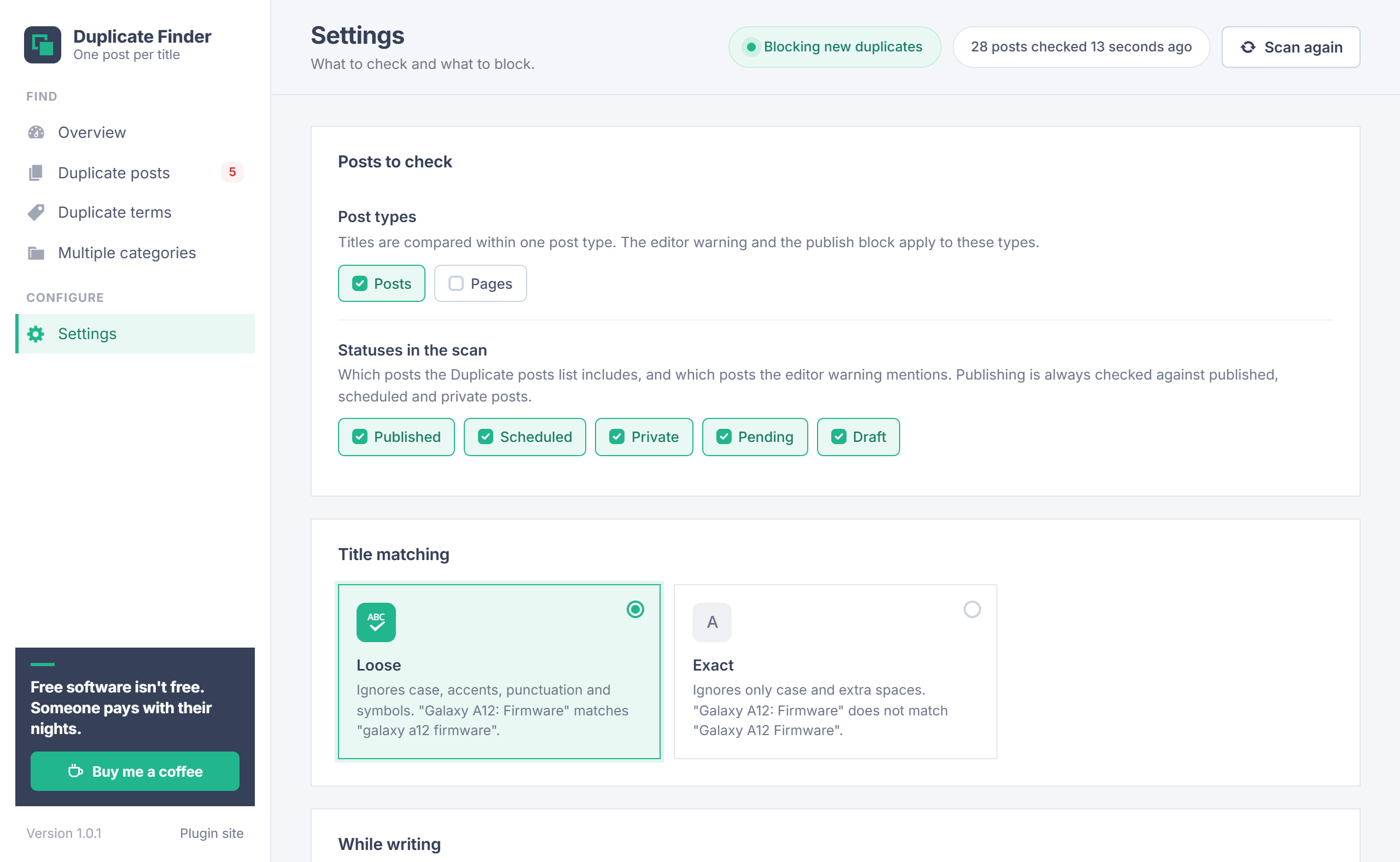
| Setting | Default | What it does |
|---|---|---|
| Post types | Posts | Which post types are scanned, warned about and blocked. |
| Statuses in the scan | All | Which posts the Duplicate posts list and the editor warning include. The publish block always checks published, scheduled and private posts. |
| Title matching | Loose | See Title matching. |
| Warn in the editor | On | The notice in the block editor and the box in the classic editor. |
| Stop new duplicates from being published | On | The publish block. |
| Administrators may publish duplicates anyway | Off | Administrators still see the warning but are not blocked. |
| Taxonomies to check | Categories, Tags | Which taxonomies the Duplicate terms list includes. |
| Compare categories under the same parent only | On | Off: any two categories with the same name are listed. |
| Refuse new tags and categories with a name already used | Off | WordPress already refuses the exact same name; this also refuses close variants such as "Galaxy-A12" when "Galaxy A12" exists. |
Not a duplicate
Some titles are meant to repeat. Not a duplicate on a group skips that title from then on: it leaves the list, and posts with that title get no warning and are not blocked. The titles you skipped are listed at the bottom of Settings, where Check again undoes it.
Your data
- The plugin stores its settings, the list of titles marked as not a duplicate, and a cached scan result. It adds no database tables.
- Posts are only changed when you trash them or use Keep only, and terms when you merge them.
- Nothing runs for visitors, and no external services are contacted.
- Deleting the plugin removes its settings and cache. Your posts and terms are not touched.
Troubleshooting
| Problem | What to do |
|---|---|
| No warning in the editor | Check that Warn in the editor is on and that the post type is selected under Settings. |
| A post I need can not be published | Change its title, mark the title as Not a duplicate, or turn on Administrators may publish duplicates anyway. |
| Two different titles are listed as duplicates | Loose matching ignores punctuation. Switch to Exact, or mark the group as Not a duplicate. |
| An import saved posts as drafts | Their titles were already published. Turn the publish block off during the import if the duplicates are intended. |
| The list looks out of date | Click Scan again at the top. |
| Same-name categories are missing from Duplicate terms | They have different parents. Turn off Compare categories under the same parent only. |
Changelog
- 1.0.1: The plugin sidebar links to the plugin site.
- 1.0.0: First release: duplicate posts, duplicate tags and categories, posts in several categories, the editor warning and the publish block.
Need help?
Questions about setup or a feature request? Contact us on our support page. You can also download the latest version (v1.0.1) here.